R&F
HomeLeague Help

Captain / Vice-captain Guide

How captains and vice-captains use the system once their role has been assigned.

Using the system

This guide assumes your account is already registered and a league officer has assigned your captain or vice-captain role. It mirrors the current captain SOP and covers both competition-entry support and match-night operation.

Before 19:30

Complete any required pre-match lineup activity before the fixture starts.

Home team default

The home team should normally submit the result in the app.

Result deadline

Submit the result by midnight on the following day.

Age-gated entries

Under 25s / Over 50s / Over 60s sign-ups require a valid date of birth before entry is allowed.

Handicap starts

The 2026/2027 Premier League uses reviewed handicaps with a maximum playing start of 40 points. Division 1 frames begin level, although Elo is still recorded in the background.

Match-night checklist

  1. 1. Open Captain Results.
    Select tonight's fixture and check that the teams and date are correct.
  2. 2. Complete the lineups.
    Home submits first; away responds after the notification. Finish before 19:30.
  3. 3. Switch to Scorecard.
    Once both lineups are locked, enter each frame result and any break of 30 or more.
  4. 4. Review before submitting.
    Check every player, score and break. The home team normally submits the completed result.
  5. 5. If the app causes a problem.
    Keep the match moving, retain an accurate paper scorecard and message the League Secretary. A manual upload link can be supplied when needed, but it requires manual authorisation and will update more slowly.

Illustrated example

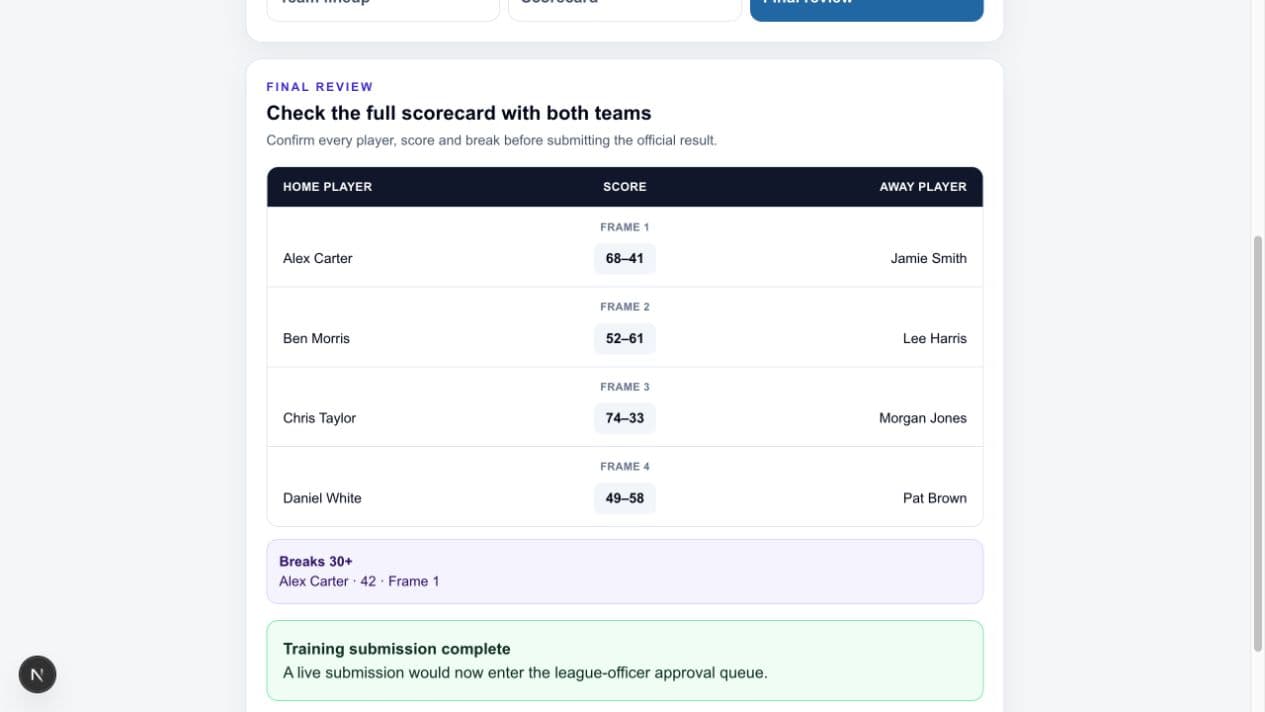
Final scorecard and submission

Home players appear on the left, frame scores in the centre and away players on the right. Check that every frame and qualifying break is complete before submitting.

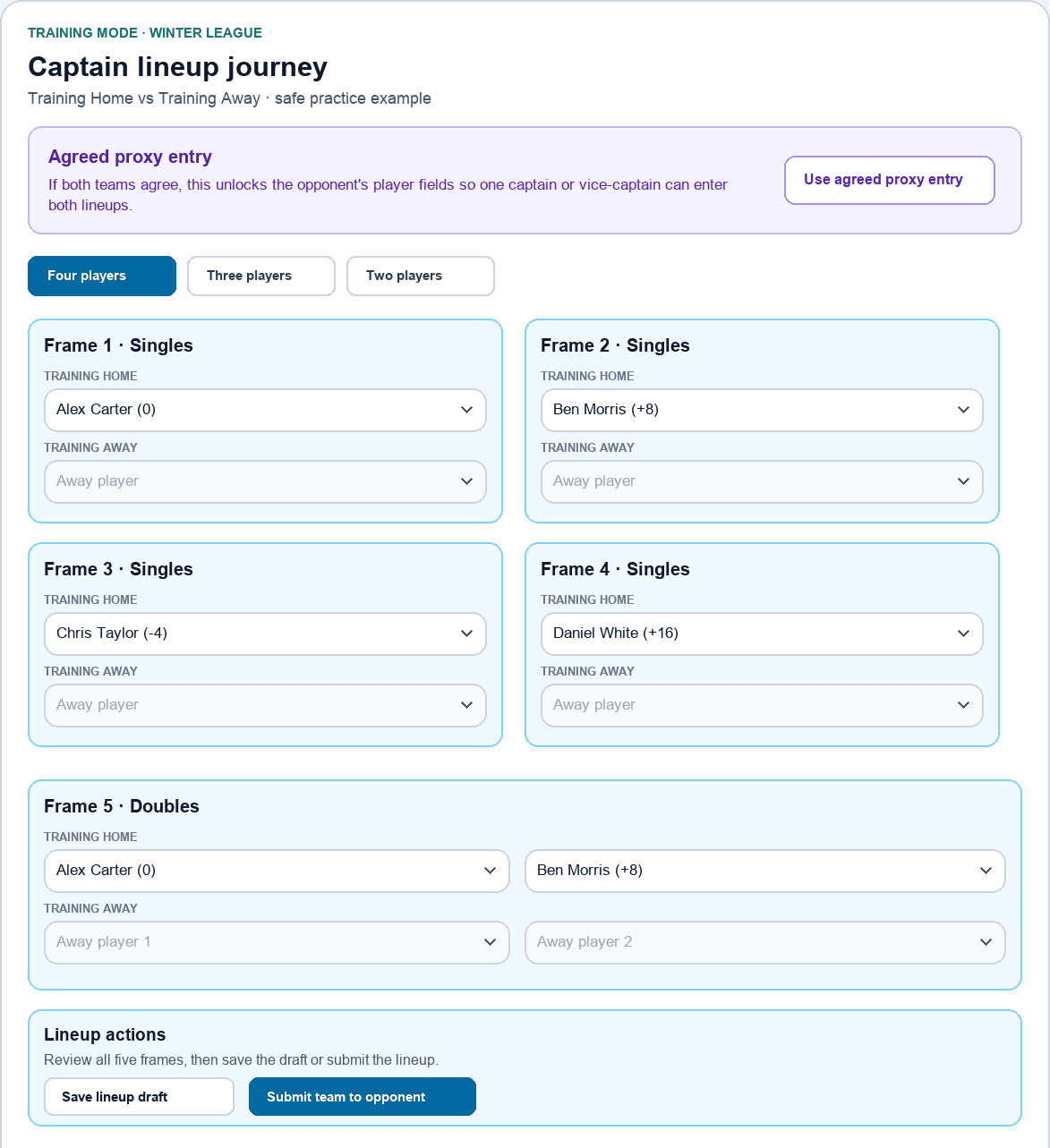
1. Normal four-player winter lineup

Choose four different singles players and complete the doubles. Lineup actions appear after Frame 5.

Winter captain lineup showing four singles, one doubles frame, and lineup actions at the end

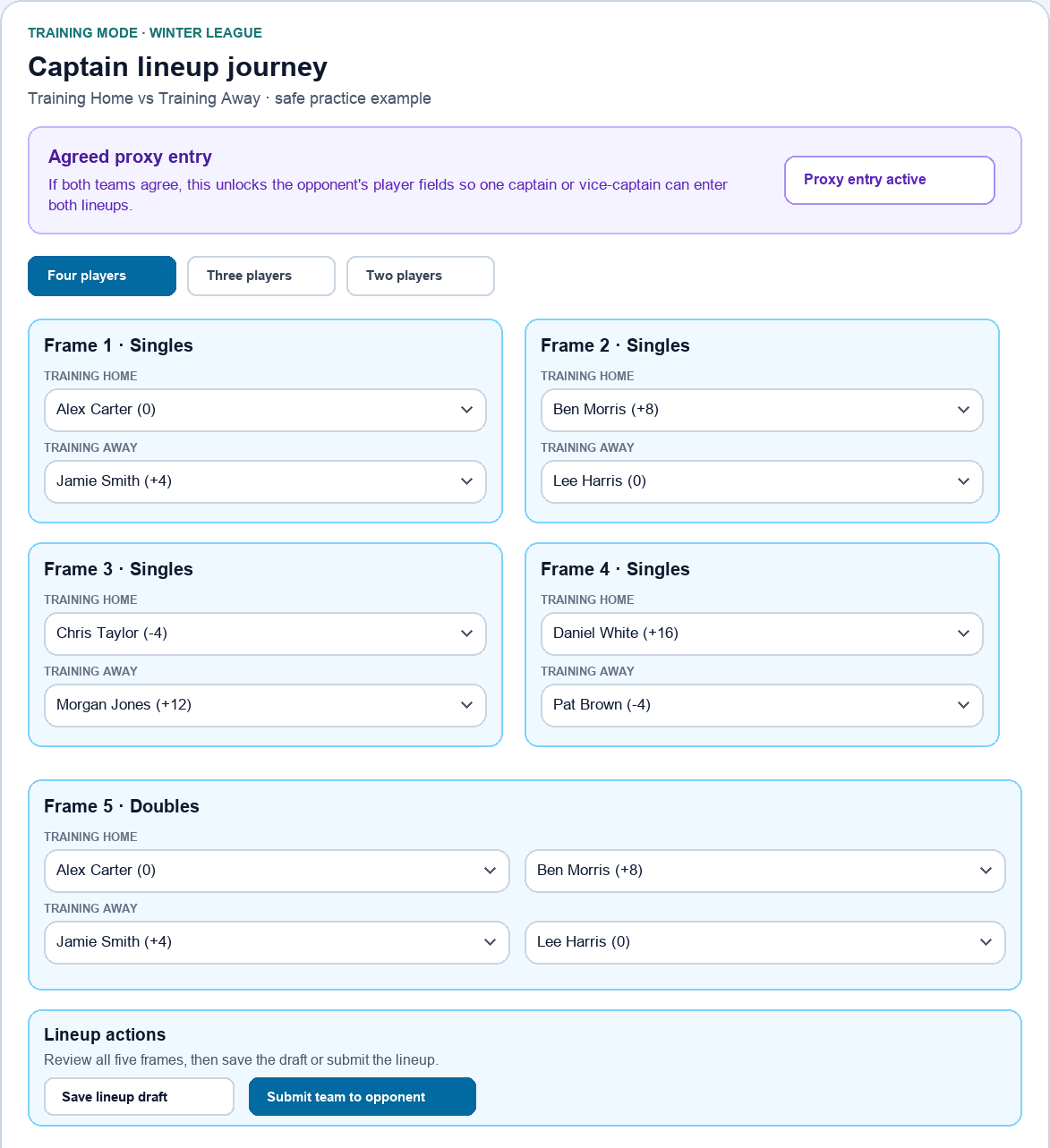
2. Agreed proxy entry

Enable this at the start only with both teams' agreement. It unlocks both sides so one official can enter both lineups.

Agreed proxy entry active with both teams' lineup fields unlocked

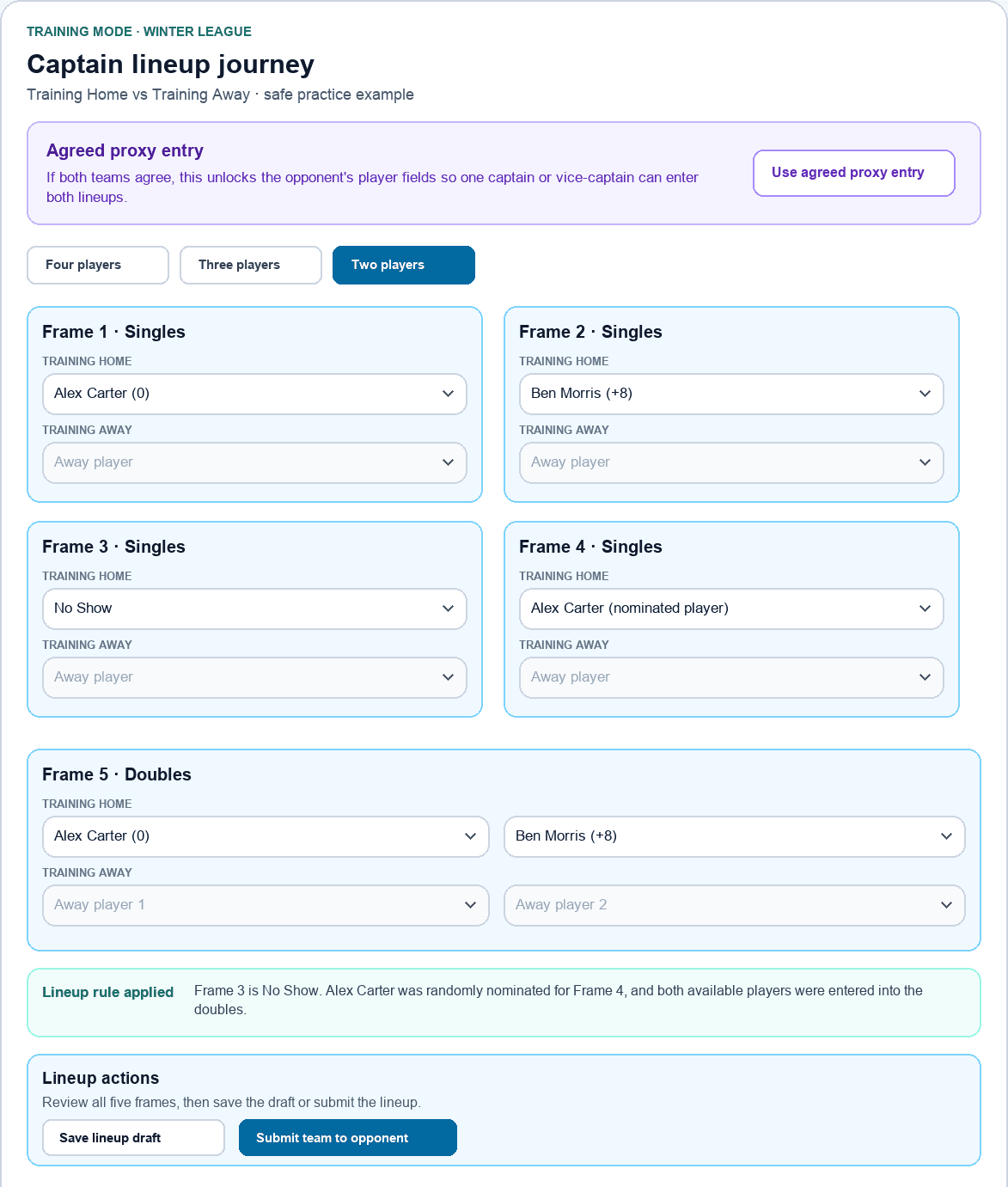
3. Two-player winter lineup

Select No Show in Frame 3. After confirmation, Frame 4 is nominated at random and both players fill the doubles automatically.

Two-player winter lineup with Frame 3 No Show, named nominated player in Frame 4, and automatic doubles pairing

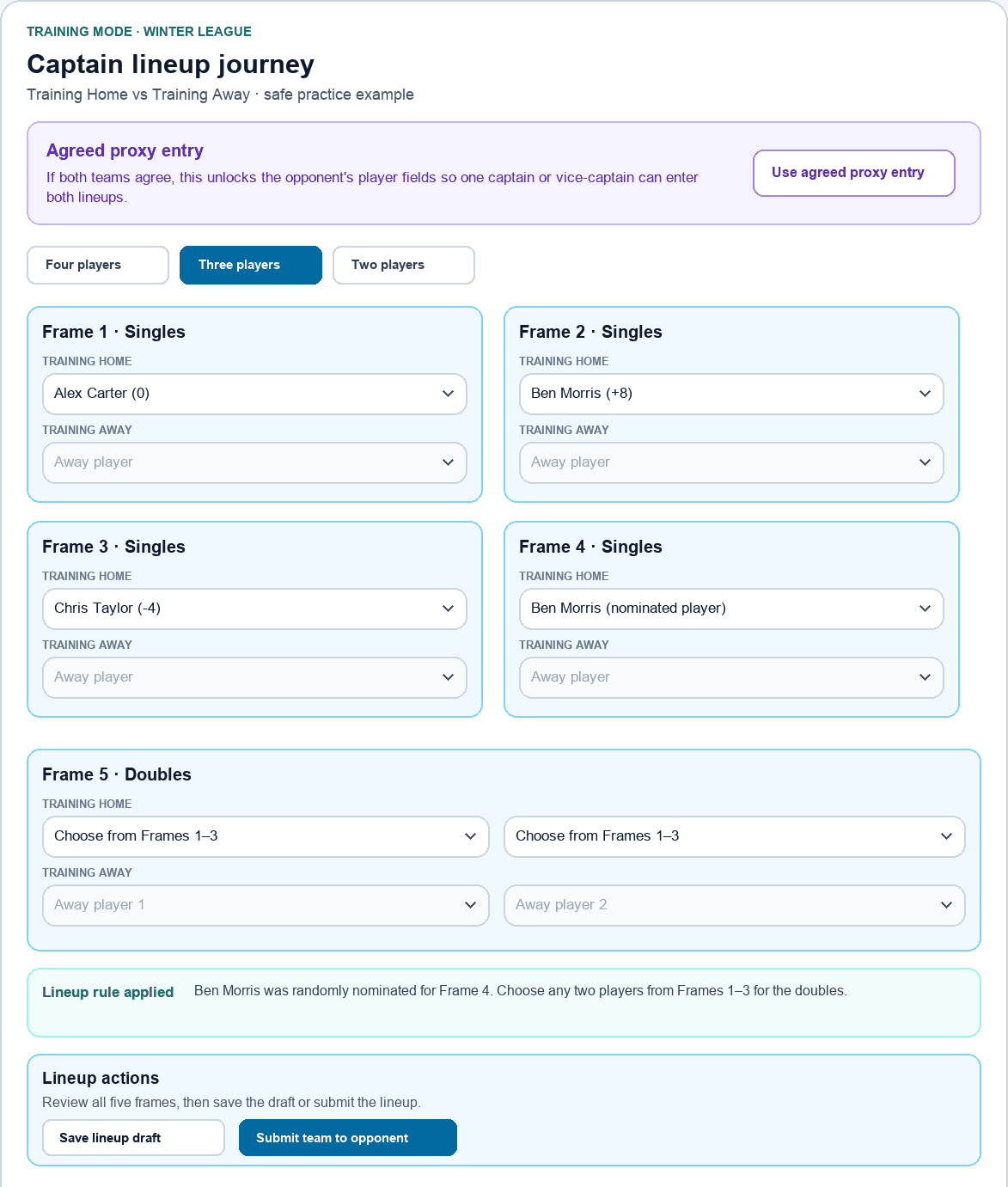
4. Three-player winter lineup

Choose Nominated player in Frame 4. After confirmation, select any two players from Frames 1 to 3 for the doubles.

Three-player winter lineup with named nominated player in Frame 4 and doubles choices restricted to the first three players

5. Review and submit the completed scorecard

Check every player, frame score and qualifying break with both teams before final submission.

Completed captain scorecard with players, frame scores, a recorded break and submission confirmation

Training names and scores are examples only. The practice screen does not save anything to live league records.

1. First check after sign-in

  • Sign in using your normal league-app account.
  • If you have been assigned as captain or vice-captain, your dashboard and notifications will reflect that automatically.
  • If Captain Results or the relevant fixture permissions are missing, contact the League Secretary, Chairman or Treasurer rather than creating a second account.

2. Competitions this app supports

  • The app supports more than the weekly league. Captains may also need to help with singles, doubles, triples, billiards, summer league, winter league, and knockout competitions.
  • When sign-ups open, make sure players are entering the correct competition type and not duplicating accounts or entries.
  • For doubles and triples competitions, confirm the correct teammate names before submitting the entry.
  • Age-restricted competitions such as the Under 25s, Over 50s and Over 60s require a valid date of birth before entry can continue.

3. Before the match starts

  • Open Notifications regularly. This is where lineup prompts, fixture reminders, and league messages appear.
  • Pre-match lineups only open on the day of the fixture.
  • The home team must submit its lineup first.
  • Once the home team has submitted, the away captain will see an inbox prompt and can then submit the away lineup.
  • Both lineup steps must be completed before 19:30.
  • Use notifications as the starting point when the system is prompting you to act.
  • If your fixture is using digital pre-match lineups, the home side enters its lineup first on the day of the fixture.
  • The away side can then respond before the fixture start time.
  • Once both teams have submitted, the lineup is locked and those player assignments flow into the result card.
  • If the app cannot be used, keep an accurate manual scorecard and contact the League Secretary for the separate result-upload link. There is no paper-record option inside the digital lineup journey.
  • The key deadline is before 19:30: if a lineup needs to be submitted in the app, it must be done before the match starts.

4. During the match

  • Open Captain Results and select the relevant fixture.
  • In the 2026/2027 Premier League, reviewed handicaps apply with a maximum playing start of 40 points. Division 1 is played off scratch.
  • Enter the frame players carefully. Player selectors show current handicaps to help you sense-check the matchup.
  • For a normal winter lineup, select four different singles players and any two eligible players for the doubles.
  • With only two players, select No Show in Frame 3, acknowledge the confirmation, and the system will nominate one of the first two players for Frame 4 and place both in the doubles.
  • With three players, select three different players in Frames 1 to 3, choose Nominated player in Frame 4, acknowledge the confirmation, and then choose any two of those three for the doubles.
  • Enter frame points accurately and add any qualifying 30+ breaks.
  • Use the same controlling device for score entry and break entry where possible.
  • Each completed frame is saved as you advance. Your current work is also kept safely on the device until final submission.

5. Proxy entry

  • Use agreed proxy entry only when one side cannot operate the app and both teams are content for one captain or vice-captain to handle the fixture in-app.
  • Enable proxy entry before selecting players. It unlocks both teams' player fields on the same screen.
  • Proxy entry does not remove the normal lineup order or final submission requirements.
  • The acting captain or vice-captain must still make sure both teams agree the lineups and result before submission.
  • Proxy use is recorded in the app audit trail.

6. After the match finishes

  • League rule: the home team should submit the result by default unless a league officer has agreed another arrangement.
  • Check the full card before submitting, especially player assignments, points, and breaks.
  • After the final frame, complete the final review and press Submit match result.
  • Submit the result when complete. The submission then moves into the league-officer review queue.
  • Result deadline: the match result must be entered by midnight on the following day.
  • WhatsApp results should be treated as an exception or backup route only. The normal expectation is that the result is submitted in the app so the system can update automatically after approval.
  • Only approved results update the league table, player records, and Elo-driven handicap history.

7. If something needs correcting

  • If a fixture needs moving, use the fixture date request process rather than relying only on an informal message.
  • If you spot an error before submission, correct it immediately in Captain Results.
  • If you spot an error after submission, contact the League Secretary, Chairman or Treasurer. They can return the result for correction or amend it during review.
  • If a 30+ break was missed or a player could not complete a competition sign-up, tell a league officer promptly so it can be fixed cleanly.

Main app areas

Notifications

Your inbox for lineup prompts, reminders, and league messages.

Open

Captain Results

Where captains and vice-captains handle lineups, frame-by-frame scoring, 30+ breaks, proxy entry, drafts, and final submission.

Open

Competition Sign-ups

Use this page when summer, winter, singles, doubles, triples, or billiards competition entries are open.

Open

Help / Handicaps

Use these pages for current handicap guidance and wider league help.

Open